





Review: Easy Release app model release – The Best!


Last week I reviewed an iPod model release application that a lot of people really liked. It was called mRelease. In the comments, there was talk about how it was virtually identical to another model release application called Easy Release. The author of Easy Release wrote in and said that this was not the case and that we should look into it more. He was obviously very passionate about his product. So I contacted him, and he sent me a copy of Easy Release, and I have to tell you, he is right. The differences are night and day.
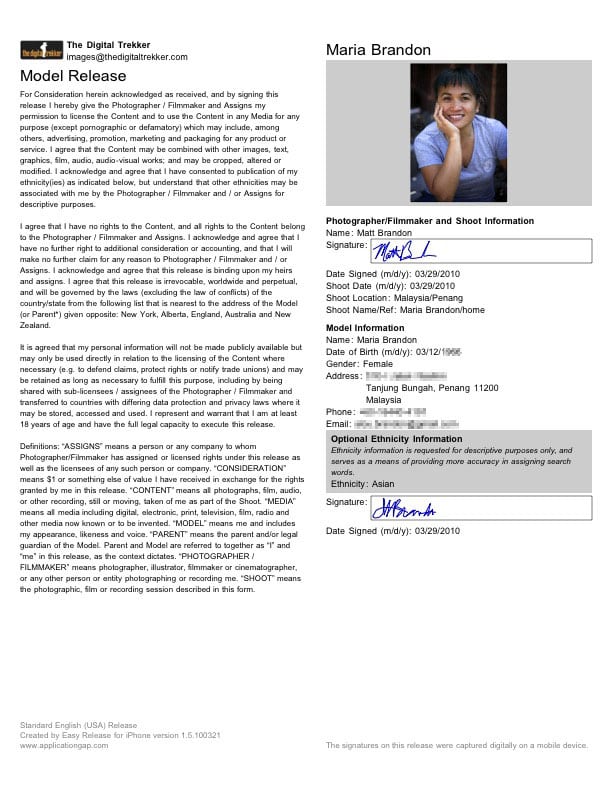
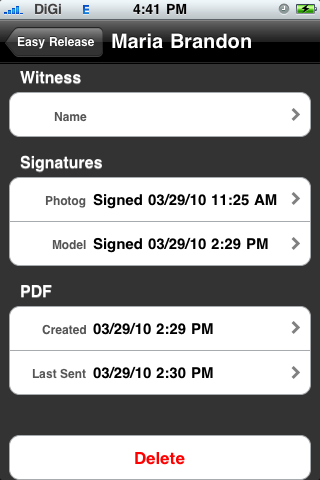
The first difference is, and I’m not trying to be smart-aleck here, Easy Release is two dollars more than the competitor mRelease. But with that two dollars you get a whole lot more. Yes, on the surface Easy Release does look a lot like mRelease. But Easy Release is much more thought through. That may be because the designer of Easy Release is a photographer and used to work for Getty images. Having worked for Getty is not a small thing when you’re building software that’s all about image releases. Easy Release gives you all kinds of customizable options. Not the least of which, and one I find helpful is the option of branding the release with my logo, company name, and company contact information. There was much more information required in filling out the release form on Easy Release, which on one hand took more time to complete, but on the other hand, made me feel comfortable that all the legal information was obtained that I might need. Just like mRelease, Easy Release offered the option of taking the models photo with the iPhone in the field and added to the release. But unlike mRelease, Easy Release requires a model’s date of birth and thus requiring a Guardian signature if the model is a minor. It also requires my signature as the photographer in the document is well. I think this will give the model a little more sense of security rather than just having a release with their name on it alone.
Another thing I noticed right off when tinkering with a model release, was that even after the model release was signed, I was allowed to make changes. However, once I made any further changes to the release after it was signed, Easy Release required I get a new signature by the model. Again, another sharp detail that makes this application well worth the extra two dollars above the competition.
Now this might not mean much to some of you, but for someone like myself living abroad, or for a photographer traveling abroad, the fact that Easy Release contracts come in 12 different languages makes it extremely useful for me. I could very easily take a photo of a Chinese person who might speak English, but would be uncomfortable signing a legal document written in English. But, Easy Release offers the release in Chinese simplified or Taiwanese scripts, allowing the model to read and feel at easy with the release they are signing and with me.
Easy Release has thought through the possibility that you might use the same model on a different shoot and need a new release. It stores the models information as well as even the witnesses information. By the way, the mRelease doesn’t even offer an option for a witness and more stock agencies will not even consider a release without a witness.
It’s a simple, easy to use application that can be a huge help shooting in the field. It allows you to rest easy knowing the model release that was just signed on your iPhone, or iPod Touch is the same one used by Getty and others. mRelease is a good attempt at this but falls short. But, maybe the next version will be much better. If you’d like to see a comparison chart between Easy Release and mRelease, click HERE. Right now, Easy Release is well worth the $10 and stands head and shoulders above any of its competition.






Great review Matt. I used Easy release in Bangkok on this last trip and it was a breeze. The model and was very impressed – also by th language capabilities.
The only additional comment I would make is it is worth getting the stylus pen because the signatures done by finger are a little shaky.
But the app does all that you have said it does in its reviews and worked seamlessly first time
Hmmm…I wonder if he'll be making an iPad version for easy full-screen transition??
Hi Amber,
My understanding at this time is that most apps will work on iPad right away and they will appear larger as well. If there are any issues we will correct them immediately and push out an update.
We are also in the final planing stages of an iPad specific version or maybe a whole new app… stay tuned! 🙂
Hope this helps!
Well done, Matt!
Hi All,
First, very big thanks to Matt for this great review!
Just thought I'd mention that we are currently in the advanced stages of “localizing” the user interface in 6 languages: Spanish, Italian, German, French, Swedish and Japanese.
This will be pushed out soon as free update of course. Many more languages (and new features) to follow in short order…
Follow us on Twitter/Facebook to get the latest news!
http://www.facebook.com/pages/EasyRelease/37826…
http://twitter.com/EasyRelease
I use Easy Release all the time for model releases- for the photo embedding alone it's great. Another App that you failed to mention was “Photographer's Contract Maker”, I think its only like $3 and I use it for just about everything else, including contracts, faster, more flexible for customizing. Both great apps. Glad people out there are making these!
I agree- Easy Release is a good app if you need images or witnesses in your contracts, but bang for your buck, Photographers Contract Maker is better.
Thanks David!! I was trying to decide between the options, you just made my decision a lot easier!
Thanks for the tip….just what I was looking for!
Our ANDROID version is now available in the Android Market – Easy Release – Model Releases for Android: http://bit.ly/av1onI
Easy Release is now accepted by Getty Images for use by their contributors. You have to be a contributor to see this: http://contributors.gettyimages.com/article.aspx?article_id=2228
You can read our press release here: http://www.applicationgap.com/news/
Not sure if someone has already covered this, but there is no “Taiwanese” script. It’s traditional (Republic of China [Taiwan] and a lot of overseas users) and simplified (mainland China) Chinese.
It sounds interesting, but i’d be more tempted to buy it if there was a demo version that say worked for 30 days and if there was the ability to import existing releases.
Not many iPhone apps give a 30 day demo. In fact I don’t know any. I am not sure why you would want to import a release to thsi app? It is an app for making releases and then sending them to your client, yourself and the model. It is not meant to be a data base.
Developers are not allowed to do time trailed apps. If you release a preview or free version of your app it has to retain full functionality meaning it has to work well and forever. You don’t have to include every feature but you can’t make it expire after a time for apple will reject it. That’s why there are no 30 day trials of full apps.